
A three times a day label looks simple until you map it onto a real clock. The gap between doses matters. Your start time matters. Sleep can push a dose into an hour you never keep. This tool helps you set exact dose times fast. Add your start time, set the daily frequency, and get a clear schedule you can follow. Wake and sleep settings help you keep doses inside your waking hours when your directions allow it.
Pick the right timing style in 10 seconds
Use strict spacing when your label says “every 8 hours” or “every 6 hours.” This method uses a full 24-hour cycle, so a late-night dose can appear. Use wake and sleep time when your directions allow flexible timing and you want to avoid sleep-time doses. If the label feels unclear, ask a pharmacist which style fits your medicine.
Medicine Schedule Calculator
Plan and manage multiple medicine schedules in one place
Medicine Schedule Plan
Personalized schedule based on your input
Based on your current device time
Smart Tips
How to Use This Schedule
This schedule is an estimate based on your input. Always follow your doctor or pharmacist instructions.
Test your result with this sample
This example shows what a clean schedule looks like.
Example input:
Times per day: 3
Start time: 1:30 PM
Wake time: 10:00 AM
Sleep time: 10:00 PM
Duration: 3 days
Example output pattern:
Day 1: 1:30 PM, 5:30 PM, 9:30 PM
Day 2: 10:00 AM, 2:00 PM, 6:00 PM
Day 3: 10:00 AM, 2:00 PM, 6:00 PM
A different start time will shift Day 1. Wake time will guide the next days when you use the sleep option.
If any result looks wrong or a button does not work, please leave a comment or email info@flashytools.com. We fix bugs and accuracy issues as fast as possible.
The first choice that decides everything
Most timing problems happen when people mix two scheduling styles. One person reads “three times a day” and spreads doses across meals. Another person treats the same instruction like a strict clock rule. Both ideas can sound reasonable, but they create different dose gaps. The safest move is to pick one style and stick with it. The prescription label usually gives the clue. If the wording sounds strict, treat it like a time-gap schedule. If the wording sounds routine-based, you may have more flexibility. A pharmacist can confirm which approach fits your medicine.
Full-day spacing uses a full 24-hour cycle. It fits directions such as “every 8 hours” or “every 6 hours,” which is why people use an every 8 hours medication times calculator or an every 6 hours medication times calculator. This model does not care about sleep. The clock keeps moving, so a dose can land late at night or at midnight. That is expected. Waking-hours spacing works when the instructions allow flexibility and you want to avoid sleep-time doses. A wake-up time and sleep time input helps because it sets a clear window. The tool places doses inside that window, still respects your chosen start time on day one, and then keeps the pattern inside waking hours on the next days. Both methods can be correct. The label and your pharmacist decide which one you should follow.
What this calculator does in plain words
This page is not only a guide. It also includes a working calculator you can use right away. The tool turns “times per day” into real clock times. You pick a start date and a start time. The tool builds a clear schedule you can follow.
The tool also supports more than one medicine. You can add one medicine and calculate a simple plan. You can also add several medicines and keep each schedule separate. This helps you avoid mix-ups.
Sleep and wake time is optional. Use it when you want doses that stay inside waking hours. Skip it when the label requires a strict 24-hour cycle. The tool will still work with no sleep settings.
Read More: Medicine 3 Times a Day: How to Set the Right Daily Schedule
Quick checklist before you tap calculate
Use this quick check so your result looks right.
- Enter the number of times per day first.
- Add your start date and start time.
- Add a duration only if you need a multi-day plan.
- Add notes when food timing matters.
- Use wake and sleep time only when you want to avoid sleep-time doses.
Features that matter on real days
The tool includes these helpful options:
- Add 10 or more medicines without losing clarity.
- Calculate one medicine at a time with “Calculate This Medicine Only.”
- Add wake and sleep time as an optional section.
- Get a schedule that splits days clearly instead of one long list.
- Download a full PDF schedule you can save or share.
- Copy a clean text summary in one click.
“3 times a day” is not always “every 8 hours”
Search results often treat these as identical. They are close, but not guaranteed to match. Every 8 hours means strict spacing across 24 hours. A clean example looks like 6 AM, 2 PM, 10 PM. The next dose returns at 6 AM. That is why people type “every 8 hours medication times calculator.”
A medicine time calculator 3 times a day can mean something looser. Many people treat it as morning, afternoon, evening. That can work when the medicine allows it. It often fits real routines better, especially if a person sleeps early or works long shifts. The safest move is simple. If the label says “every 8 hours,” follow it. If it says “3 times daily,” ask the pharmacy if exact spacing matters or if “with meals” timing is fine.
Understand Each Button Before You Start
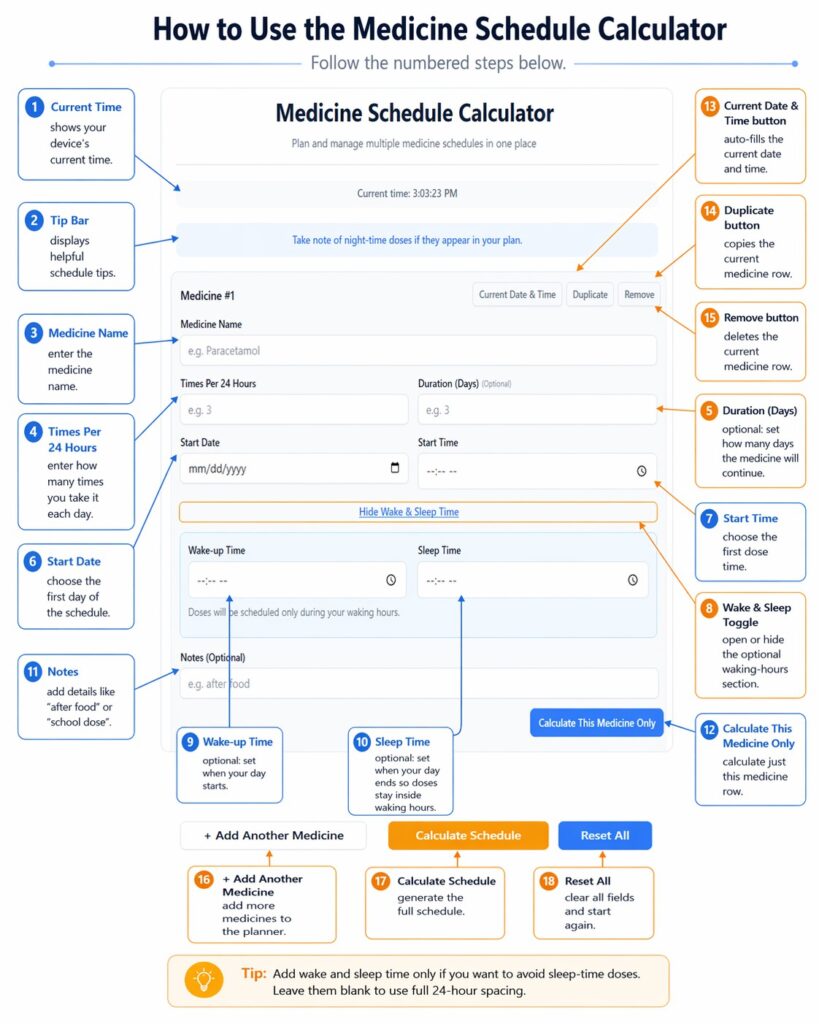
How to calculate medication time without turning it into a math project
A simple plan usually beats a complicated one. Many people overthink this step and still end up with bad timing. Pick the frequency first. That is why people search “medicine time calculator 2 times a day,” “medicine time calculator 4 times a day,” and “medicine time calculator 5 times a day.” They want a known pattern.
Choose your first dose time next. This is the anchor. A start time of 1:30 PM creates a very different day than 8:00 AM. The tool should make that clear. Now look at the result and ask one honest question. Does the schedule land inside sleep hours? If yes, decide if you must accept night doses or if you can use a waking-hours schedule. That is where wake-up time and sleep time become helpful. Keep them optional. Many people do not need them. People who do need them usually know right away because the schedule looks impossible.
Example you can copy in 30 seconds
A quick example helps you see how the tool thinks. Use this test when you want a clean 3 times a day medication schedule.
Example input
- Times per day: 3
- Start date: pick today
- Start time: 1:30 PM
- Wake time: 10:00 AM
- Sleep time: 10:00 PM
- Duration: 3 days
What you should see
The tool should show an interval of 4 hours inside waking hours. Day one should start from your selected start time. Day two and day three should start from wake time.
You should see times like:
Day 1
- 1:30 PM
- 5:30 PM
- 9:30 PM
Day 2
- 10:00 AM
- 2:00 PM
- 6:00 PM
Day 3
- 10:00 AM
- 2:00 PM
- 6:00 PM
This example matches how many people use a medicine 3 times a day calculator in daily life. It also shows how wake and sleep settings can prevent late-night doses.
The schedules people expect a real tool to handle
This is where your tool should shine. People search for a calculator, then test it with common patterns.
| Times per day | Common gap in strict mode |
|---|---|
| 2 | 12 hours |
| 3 | 8 hours |
| 4 | 6 hours |
| 5 | 4 hours 48 minutes |
| 6 | 4 hours |
Medicine 2 times a day calculator
Two times daily often implies a 12-hour gap in a strict model. That is why people ask, “Does medicine have to be taken exactly 12 hours apart?” Some medicines tolerate a little variation. Some do not. Still, a clean baseline is easy. A typical schedule looks like 9:00 AM and 9:00 PM. A person can move that to 8 and 8 or 10 and 10. Consistency matters more than perfect theory in many cases. Exact spacing matters more when the label says it does.
Medicine time calculator 4 times a day
Four times daily often maps to every 6 hours. A strict plan can look like 6 AM, 12 PM, 6 PM, 12 AM. Midnight is common here. People dislike it. That is why wake and sleep time helps when the medicine allows flexibility. If strict timing matters, keep the midnight dose. If strict timing does not matter, a waking-hours schedule can reduce missed doses. Your tool should support both without forcing one approach.
Medicine time calculator 5 times a day
Five times per 24 hours is the pattern that exposes weak calculators. The gap is about 4 hours 48 minutes. That creates odd times. People miss them if the tool does not present them clearly. A strict example can create a 3:12 AM dose. Many people cannot follow that. A waking-hours schedule can help, but it may compress doses into the day and create tighter gaps. That is not always acceptable. The tool should show the timing honestly and let users decide with guidance from their provider.
Fast timing examples for 2, 4, and 5 times per day
Many readers want a quick answer. They want a starting point they can trust. These examples help you check your tool result at a glance.
Medicine 2 times a day schedule example
This pattern often looks like a 12-hour gap.
Example start time: 9:00 AM
- Dose 1: 9:00 AM
- Dose 2: 9:00 PM
A medicine 2 times a day calculator should show this style when you use strict 24-hour spacing.
Medicine 4 times a day schedule example
This pattern often follows an every 6 hours medication times calculator.
Example start time: 6:00 AM
- Dose 1: 6:00 AM
- Dose 2: 12:00 PM
- Dose 3: 6:00 PM
- Dose 4: 12:00 AM
A midnight dose can appear in strict mode. Wake and sleep time can help when flexibility is allowed.
Medicine 5 times a day schedule example
This pattern creates uneven looking times because the gap is 4 hours and 48 minutes.
Example start time: 8:00 AM
- Dose 1: 8:00 AM
- Dose 2: 12:48 PM
- Dose 3: 5:36 PM
- Dose 4: 10:24 PM
- Dose 5: 3:12 AM
This is where many tools fail. A medicine time calculator 5 times a day must handle minutes correctly. It must also show a clear schedule that does not confuse users.
Quick check table
| Times per day | Common spacing in strict mode |
|---|---|
| 2 | Every 12 hours |
| 3 | Every 8 hours |
| 4 | Every 6 hours |
| 5 | Every 4 hours 48 minutes |
| 6 | Every 4 hours |
Medicine time calculator 3 times a day
This is the big one because “three times a day” can mean two different things in real life. Some users want a strict plan that matches “every 8 hours,” with evenly spaced doses across a full 24-hour cycle. Other users want a practical plan that stays inside waking hours so they do not end up with a late-night dose. Both are valid, depending on the label and the pharmacist’s advice. The tool feels more useful when it shows the timing clearly and makes it easy to switch between these two approaches. A short note in the results helps guide the choice, such as: “Want to avoid sleep-time doses? Add wake-up and sleep time.”
Medicine time calculator 5 times a day, 4 times a day, 2 times a day
Some readers will skim and jump straight to their number. That is normal behavior. Help them quickly. Keep these sections easy to spot and easy to understand. A person who needs a medicine time calculator 2 times a day usually wants a clean 12-hour rhythm. A person who needs medicine time calculator 4 times a day expects a 6-hour pattern and may notice the midnight dose issue right away.
A person who needs medicine time calculator 5 times a day often needs help because the gap turns into odd minutes, not neat hours. The keywords fit naturally here because they match what the reader is trying to do. You do not need to repeat them in every line. Make the timing examples clear and let the tool handle the exact math.
Kids schedules rarely match “perfect” spacing
A 3 times a day medication schedule for kids has one extra problem. School. Parents want a plan that fits morning routines, school hours, and bedtime. A schedule like 7 AM, 3 PM, 9 PM feels realistic. Many families can follow it without stress. Strict 8-hour spacing can still matter for certain medicines, so parents should confirm if exact timing is required. Your tool helps because it shows the real clock times from the chosen start time, then lets parents add notes such as “school dose” or “after food” to avoid mix-ups.
Travel and time zones without confusion
Travel can break a schedule even when you follow it carefully. This is why people search medicine time zone calculator and medicine time zone calculator app free. They want a simple answer during a busy day.
A simple rule helps many people. Reset your schedule after you land. Pick a new start time in the local time zone. Then follow the schedule from that new start. This prevents hidden “too early” or “too late” gaps.
A simple travel use case
You take a dose at 8:00 AM at home. You land in a new time zone. Your phone time changes. Your next dose time may shift without you noticing.
Use the tool like this:
- Set your new start date and local start time after landing
- Run the schedule again
- Save the PDF schedule on your phone
A medicine time zone calculator app can also do reminders, but a web tool still helps when it shows device time clearly and builds a fresh plan.
When a pharmacist should guide the change
Some medicines need tighter timing than others. A pharmacist can guide travel timing when:
- the medicine needs strict every 6 or every 8 hours spacing
- you cross many time zones in a short time
- the medicine label warns about missed doses
Your page should keep this message simple and calm.
Multi-medicine schedules need separation, not one long list
A single combined list looks tidy, but it increases mistakes. People confuse which dose belongs to which medicine. They miss details like “with food” or “empty stomach.” Your tool’s structure matters here. Each medicine should sit in its own block with frequency, interval, and start time shown clearly. Notes should stay attached to the same medicine. The “calculate this medicine only” option helps users double-check one schedule before they run all medicines together. Overlaps can happen, such as two medicines landing at 9:00 AM. That overlap is not always harmful, but it can confuse users. Separate blocks reduce that confusion.
Dose strength calculators are a different topic
Some related searches focus on strength and mixing, not timing. Easy drug dose calculator, dose calculator mg/ml, and drug dosage calculator online sit closer to medical advice and carry more risk. A medicine dose time calculator is safer when it stays focused on timing and scheduling. If you want to cover strength later, build it as a separate tool page. That keeps your timing tool clean and helps SEO because each page answers one clear intent.
Tablet counts, days supply, and refill timing
Many people want a schedule and a supply answer in one place. They also search questions like 3 tablets a day for 30 days how many tablets because they want quick clarity.
Simple tablet count example
Three tablets per day for 30 days equals 90 tablets. This is a common way people estimate supply.
Days supply calculator logic in simple words
Days supply is often:
Total tablets ÷ tablets per day = days of supply
This matches what a days supply calculator and day supply calculator app try to solve. It also connects to free prescription calculator searches. People want to know how long a bottle will last.
Refill timing that feels practical
A medication refill calculator app often warns you before you run out. You can do a simple version too.
Pick a buffer so you do not hit zero tablets.
A 3 to 5 day buffer is common for many people.
Example:
- You have 30 days of supply
- Plan to refill around day 25 to 27
This is a practical habit. It reduces stress and missed doses.
Small note that keeps the page safe
This page helps with timing and planning. It does not replace medical advice. Users should follow label instructions and confirm changes with a pharmacist when needed.
A simple way to use the tool without confusion
Many tools fail because they ask users to fill fields in a random order. Your page copy should guide the right flow. Start with times per 24 hours because that sets the pattern. Add start date and start time next because that anchors the schedule. Use wake and sleep time only if you want to avoid sleep-time doses. Add notes when timing depends on food or daily routine. Download the PDF so the plan stays easy to reference.
A few small habits also reduce mistakes. Show both the interval and the clock times so users do not confuse “3 times a day” with “every 8 hours.” Let users adjust a start time if it creates an unrealistic midnight dose. Keep each medicine in its own block and encourage users to verify one medicine at a time when the list gets long. If you want this page to rank, keep it specific and useful. The keywords already fit because they match real questions users ask.
One small detail that keeps schedules realistic
Day 1 follows your selected start time. The next days follow your wake and sleep window if you turn that option on. This is normal. It keeps the schedule practical and avoids doses that land inside sleep hours. If you leave wake and sleep blank, the tool uses full 24-hour spacing instead.
FAQs about medicine timing
Tap a question to open the answer. The tool helps with timing only.
Three times a day often comes close to 8-hour gaps in strict 24-hour spacing. Wake and sleep time can shift the plan to fit your day, so the gaps can change.
Pick a start time you can follow each day. Use the calculator to set the next dose times. Keep the plan steady unless your pharmacist advises a change.
Some medicines need tight spacing. Others allow a small window. The label and a pharmacist can confirm what fits your prescription.
Every 8 hours uses a full 24-hour cycle. A dose can land late at night or early morning. That result is normal in strict spacing.
Wake and sleep time keeps doses inside your waking hours. The tool spreads doses across that window instead of the full day.
Three tablets per day across 30 days equals 90 tablets. The total changes if one dose uses more than one tablet.
Reset the start time after you arrive, then generate a fresh schedule in local time. A pharmacist can guide strict hour-gap medicines during long flights.
Strict hour-gap labels can make early doses risky. A pharmacist can confirm what is safe for your exact medicine.